Today I want to talk about FigJam, a tool of Figma that has completely transformed the way I organize and structure my ideas during the development of projects.
In my day-to-day design, the creative and collaborative process is fundamental. Since I started using FigJamI've noticed a great change in how I prepare my notes during the briefing and how this allows me to outline wireframes quickly. And yes, I've also been using it to make key notes in the first design sketches, which allows me to have a clear and structured vision of the project from the beginning.
Take Efficient Notes During Brieffing Meetings
One of the main uses I give to FigJam is as a tool for take notes of briefing during initial meetings with customers. Previously, he used to carry several disorganized notes, which made the process a little complicated when he started to design. With FigJamI can. to organize all the customer's ideas, needs and requirements in one place, in a visual and orderly way. This has allowed me to improve efficiency and, above all, clarity in my projects.
I'm going to show you in a practical way how you can make a first note of a meeting:
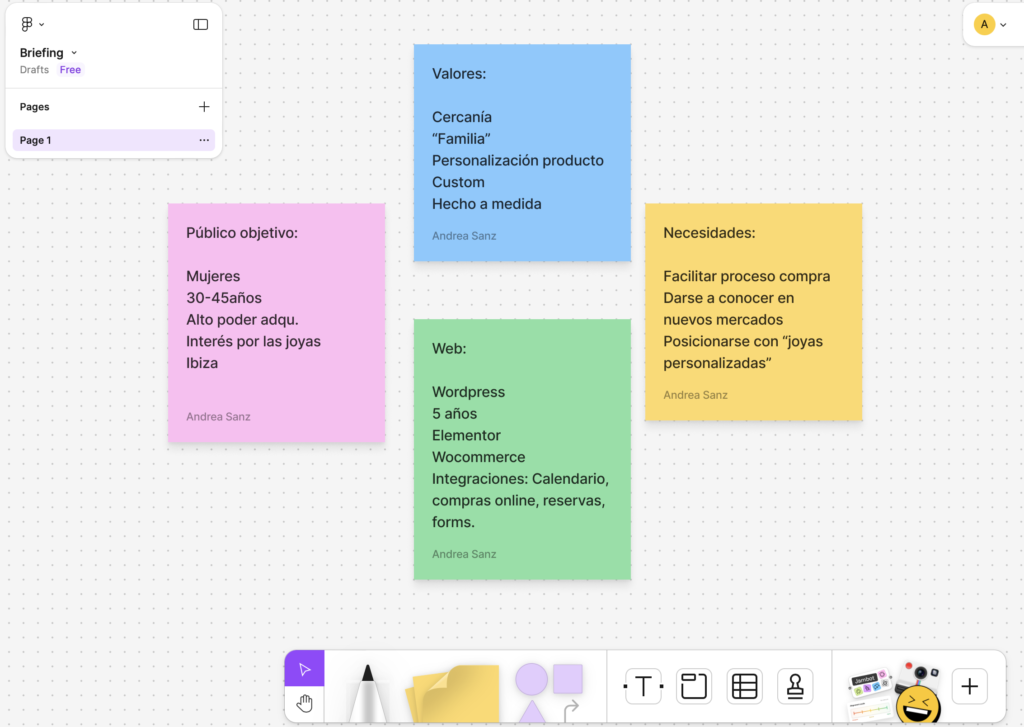
In briefings, it is very easy to miss important details, but with FigJam I can create simple flow diagrams, mental maps or even organized lists, which facilitates a global vision of everything that was discussed.
Creation of Wireframes: From Ideas to First Bocetos
As a designer, one of the most important phases in any project is the creation of wireframes, which are the first visual schematics of the structure of a page or application. FigJam has been of great help to me create the basis of my wireframes in an agile and clear way. I can add basic elements like squares, lines, texts and annotations which will then become the final design.
In example that I show youYou can see how I use FigJam to create an initial scheme of Home page from a website, where I included services, blog and a FAQs section.
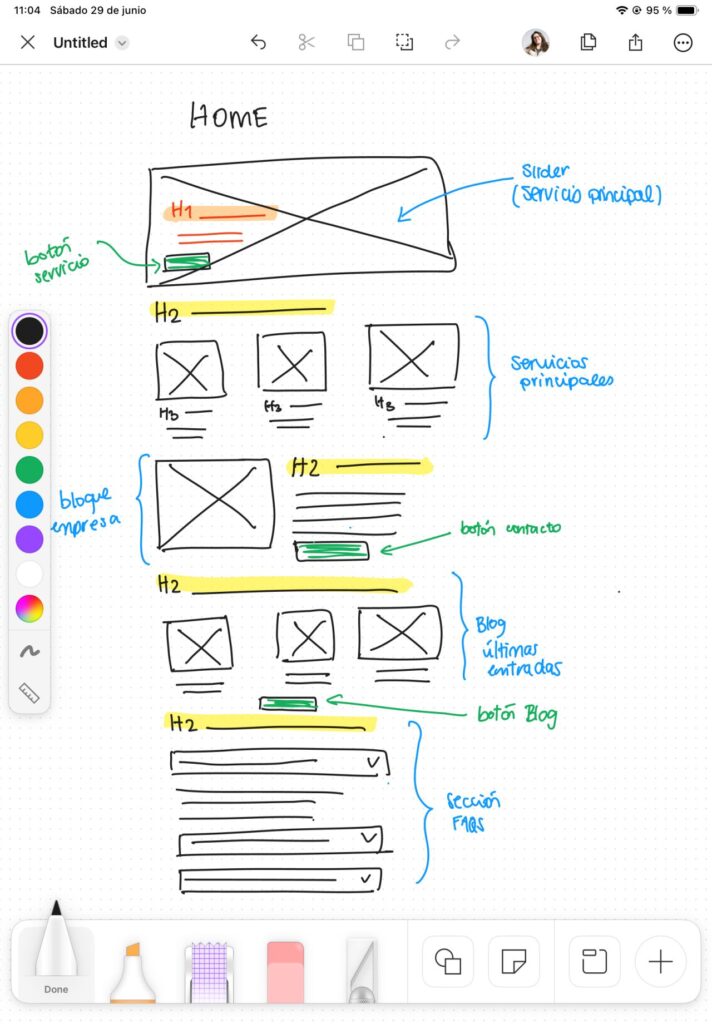
This kind of quick outline helps me to visualize the structure of the pages in a collaborative way, allowing my entire team to share ideas and comments directly about the document.
A Tool for Effective Collaboration
Another reason I love it FigJam is your ability to facilitating real-time collaboration. When working on design projects, it is vital to be aligned with the team. Thanks to FigJam, I can share my work with other team members or even with the client himself, who can add your own notes, comments and ideas directly over the file, without going from side to side with unnecessary emails or meetings.
In my last project, FigJam allowed me to organize and visualize my ideas in a clear and efficient way, which improved communication with the team and the client. In addition, the capacity to move elements in a flexible way and make live adjustments simplifies the review of ideas, saving time and reducing errors in later phases.
FigJam: A Total Change in My Design Process
Since I started using FigJamI've felt my design process has taken a positive turn. Let me. speed up the creation of wireframes and organize all the notes and annotations I need during the research and briefing phase. I no longer have to jump between tools, as I can do everything from the same platform, which also reduces distractions.
If you haven't tried FigJam yet, I totally recommend it. No matter if you're a designer, part of a marketing team or developer, FigJam makes it easier that all equipment is aligned from the beginning project. With FigJamnot only can you outline ideas, but you can also collaborate quickly and efficiently with your entire team.
In short, FigJam It is a tool that has changed the way I organize and develop my projects. From take notes at meetingsuntil creation of wireframes. FigJam offers flexibility, real-time collaboration and an intuitive interface that facilitates the entire creative process.

UX / IU Designer and Digital Marketing Specialist
Creating intuitive experiences and effective strategies.