Learnflix is a mobile application that allows users to watch movies and / or series that promote a professional environment they want. You can find topics such as Science, Creativity, Informatics, Music and many other topics.
From these, the application will offer you those films that can provide you with information of interest related to this topic. In addition, the sheet includes the platforms on which you can find the film or series.
The main objectives of implementation are:
- Learn new things from movies and series
- Rapidity and ease when it comes to ampressing.
- Connect users of similar interests to create related communities.
- For all kinds of audiences.
Tasks for Learnflix
In the Learnflix project, I have carried out a number of essential tasks to establish a solid brand identity and develop an attractive and functional mobile application. These tasks include:
Naming: Development of the name «Learnflix,» which clearly reflects the combination of learning and film entertainment.
Branding: Creating the visual identity of the brand, using blue colors that represent learning and trust.
Application Design: Design of different navigation screens, focused on facilitating learning through film visualization.
Learnflix Logo Design
The Learnflix branding has been designed to transmit the learning and confidence values essential for an educational application.
The blue color is predominant in the palette of Learnflix with tones like # 93CBFF and more electric blue like # 2542AA. These colors are known to evoke feelings of calm, trust and wisdom, which makes it ideal for an educational platform. In addition, blue is one of the colors that is usually used as a «Training».
I mean, he usually identifies with studies or intelligent. is usually a color that represents fidelity and community, something very important as a brand value. Since we want to create a community of users that allows us to connect for interest.
The combination of black and white colors is then used as a background to contrast logos. Which allow us to visualize and focus attention on the main information, the brand.

The logo has color variants, for use in other styles and adaptations such as:

In addition, the icon that would represent such an application has also been made when it comes to the download:

Design of the Learning Application
The application design Learnflix has focused on creating a user experience that facilitates both entertainment and learning.
Content and Functions of the Learning Application
A follow-up of functionalities has been taken into account throughout the application as follows:
- Catalogue of films by learning themes
- Movie search and series according to the subject of interest to learn.
- Notifications of new additions in your preferred themes.
- User reviews regarding the film and / or series. In addition to the possibility of adding ratings of the films you have already seen.
- The premiere section with the films you can find on the cinemas billboard and where to see them.
- It allows other users to receive recommendations or start chats with people of the same interest, of the same subject.
- Information of interest about the platform on which you can find / see that series and / or film. In addition to the important references mentioned in this and what knowledge to learn.
All the content in the application has been represented with typography Helvetica Neue. This has been selected for Learnflix for its clarity and modernity. This source is known for its legibility and its clean appearance, making it ideal for applications that require effective and rapid communication. Helvetica Neue brings a touch of professionalism and simplicity to the design, ensuring that the texts are easy to read on any device. Its versatile and neutral style allows it to be perfectly integrated with the other visual elements, strengthening the consistency of the brand.
Application panels:
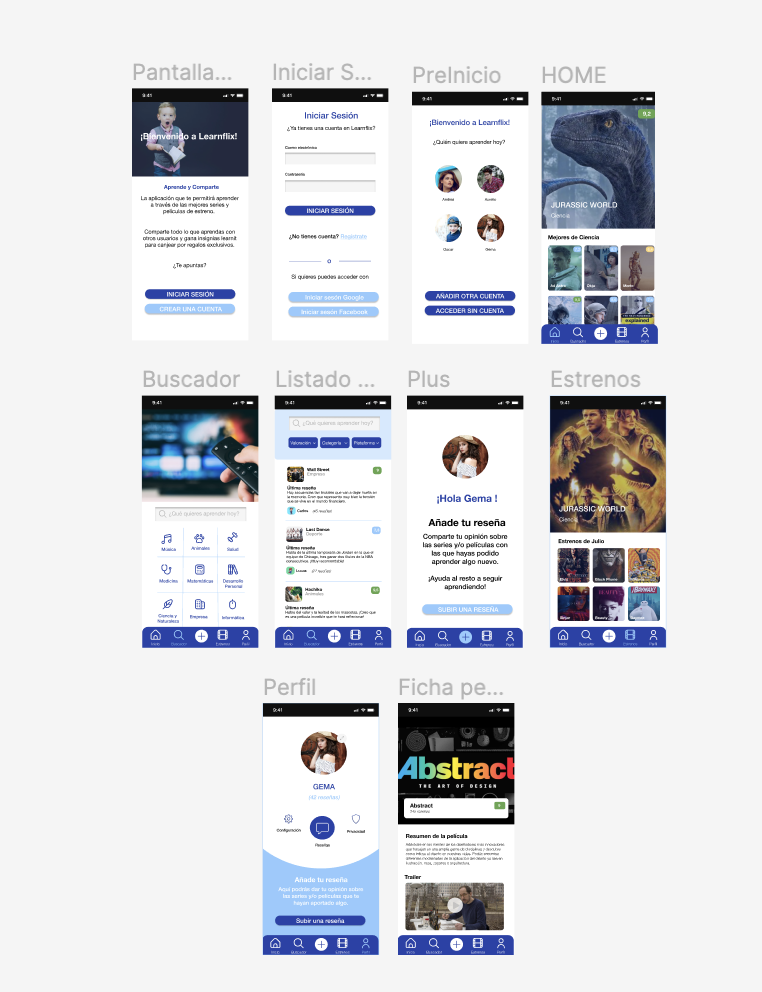
The application has different screens designed for the optimal navigation of users, from their registration to their use. For this purpose, I will detail the screens designed below:
Display Access: This screen represents user access, with the possibility to log in or create an account. It also includes initial information on the application for non-account users to encourage them to register.
Opening of the sitting: When the user clicks on Login, it allows you to navigate to the access screen on which you should enter the user and password. It also gives the possibility to access in a simpler way through other platforms such as Facebook or the Google account. We incorporate a small access to the register, so we can fly to the previous navigation screen.
Preinitiation: The moment the user log in with your account, this allows you to preview the different application access profiles. This screen will also appear when this application remains with the user open. In this way, each user will be able to have its custom profile with the content you want to learn.
Home: When we have already accessed the application, we will go through the different categories in the preview that allows us to start the tab. In this we can find recommendations according to our learning interest preferences.
Seeker: To facilitate the user's search for content, we have an integrated search engine that allows you to search for keywords or themes, represented from iconography.
Search List: Once the corresponding search is done, from the key word or category, a list of results will then be shown. This list of results includes a preview of user reviews and an average evaluation. In addition, it incorporates in the top a search engine with different filters in case we want to further link the search.
Plus: This page represents the increase of content by users. I mean, the reviews and assessments they bring. The idea is that it is a simple page where the user can easily upload content.
Premiums: Another section we can find in the app is that of Premiums. This page represents the highlights we found in the movies. In this way, users can be informed of the films that will be released soon and where they can see them. In addition, you will receive recommendations from premiere regarding the interests of the user.
Profile: If we access our profile, we can edit the settings and privacy. In addition, personal data or image can also be edited. On the other hand, a review button is included, with the intention that the user will always be active in valuing the films he has seen.
Product Sheet (Film): Once we are inside the film we can find information such as:
- Film or series summary
- Knowledge you can learn from this
- User reviews
- Reproduction platforms of the content
- Trailer
Here is an example of the designs made for this application:

UX / IU Designer and Digital Marketing Specialist
Creating intuitive experiences and effective strategies.